Below is a screen capture of the folders list context menu. To bring up this menu, right-click the list of folders in the Action "Copy" editor, Action "Archive", or Action "Delete" editor window. 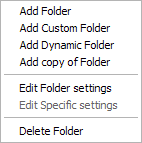
|
Below is a screen capture of the folders list context menu. To bring up this menu, right-click the list of folders in the Action "Copy" editor, Action "Archive", or Action "Delete" editor window.
|