The picture below shows the Folder Editor. Strictly speaking, you cannot edit folders, but filters associated with them. 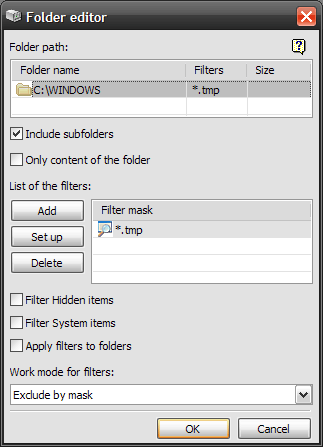 Here you can associate filters with a folder. Filters allow you to skip files you don't want to copy. For example, you can filter all .tmp files, which usually are temporary files, so they don't get backed up. To do so, press the Add button, enter "*.tmp" in the Filter Editor, and select Exclude by mask from the Work mode for filters list. Every time you add or delete a filter BackUpTime recalculates the size of the folder in accordance with filters left. You can turn this feature off in the settings.
|


