Keep your passwords, logins and other private and sensitive information in SECURE place!
Price: 9.95 EUR per user. For PC version.
Check the prices of mobile versions in the suitable app stores.
Price include technical support by E-mail for an one year and free upgrades of PC version for the current version ( 2.x ).
download secureword pc purchase secureword pc download secureword windows phone download secureword windows store help for secureword more screenshotsSupported systems: Windows XP, Windows server 2003, Windows Vista, Windows 7 ( Seven ), Windows 8 ( Eight ), Windows 8 Store (metro) x86, x64 and ARM, Windows Phone 7 & 8
SecureWord application have successfully passed the test Verified for Windows XP by VeriTest.
Bottom Line: SecureWord is easy and useful password keeper. Secure, password protected database to store any confidential information. Mobile clients, strong encryption and SkyDrive cloud service synchronization.
SecureWord is a secure password manager (password keeper) program that uses Advanced Encryption Standard adopted by the US Government in 2002. Your data will always be safe and secure thanks to built-in protective measures. For example, the program automatically clears clipboard when you minimize or exit it.
We use AES block cipher to protect your sensitive data with 256 bit key. CBC mode of AES cipher is used to hide internal data structure. Every time when you save the database, SecureWord regenerates IV (initialization vector) of AES cipher to hide the changes. PBKDF2 function is used to mix your password with 256 bit salt in 12000...65000 rounds to avoid brute force attacks.

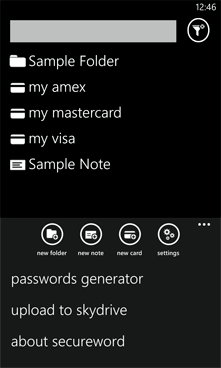
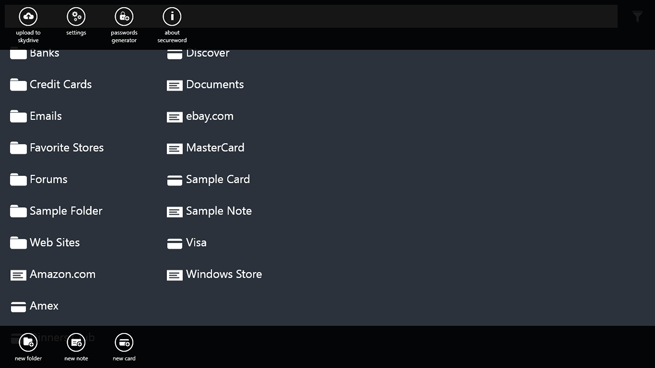
SecureWord is also one of the most convenient password keepers - it can be placed in the system tray and all you have to do in order to launch it is to click twice on the icon. Each user has his or her own password so that the program can be used by multiple users without any security compromises. The best thing is that you can use SecureWord to store any information, no matter how long or short - you can even store files! And you can import/export your data should you need to switch to a new computer. In addition, you can backup or synchronize your data. All these features were created to make SecureWord a great tool not only for home but office as well.
Program's built-in password generator lets you instantly come up with a new password. Pleasant interface and convenient search system make browsing through and finding necessary secure information very easy. All things considered, SecureWord is the best password manager among the ones available on the Internet - an ideal tool for storing your data safely and securely.

An improved security system. While the data is in the computer memory it's most unprotected. We use two functions that avoid this effect:
- Clearing clipboard on exit.
- Unloading user database on minimize. For example, you can quickly find a required password and click the minimize button. All database will be unloaded but the SecureWord itself will still be available in the system tray (near the clock).
Convenient and easy interface. We designed it with special attention because the ease of your work depends on it. We did all we could to make it easy, convenient and fully functional. Also, you can choose different pictograms for your Notes and Folders to ease the navigation through that database.
Our search system is quick and adjustable. Just enter a word or a part of the word in the Search bar and you will receive a list of Notes, containing that word. You can add letters to the word or erase them - the list will be updated dynamically!
Unlimited Note database. Store as much Notes, Folders and Files as you want to!
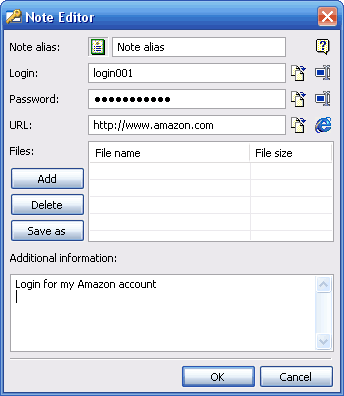
One computer can have as many users as you want - each user will have his own database.
The passwords generator is included in the program. Now that SecureWord will take care of your passwords, you don't have to remember them all or be afraid of forgetting anything. With the help of SecureWord you can also create undeniably reliable passwords.
To copy the database to a different computer (like a notebook) you will only need to copy one file (SecureWorld will show you which one) or copy it to SkyDrive cloud service from Microsoft. Mobile clients will easily get it.