Easy backup software for Windows.
ANYONE MAY USE THIS SOFTWARE BECAUSE IT'S FREE. HOWEVER, IF YOU WANT TO GET SUPPORT OR ENABLE ADDITIONAL FUNCTIONALITY IN THE PRODUCT, YOU SHOULD PURCHASE THE LICENSE(S).
Price: 9.95 EUR per user (to enable extra functionality).
Price include technical support by E-mail for an one year and free upgrades for the current version ( 1.x ).
download backuptime purchase backuptime help for backuptime more screenshotsSupported systems: Windows 2000, Windows XP, Windows server 2003, Windows Vista, Windows 7 ( Seven ), Windows 8 ( Eight ), Windows 10.
BackUpTime application have successfully passed the test Verified for Windows XP by VeriTest.
Bottom Line: This software features straitforward, eye-pleasing interface, dynamic folders, custom folders, and built-in scheduler.
Information duplication and creating backup archives
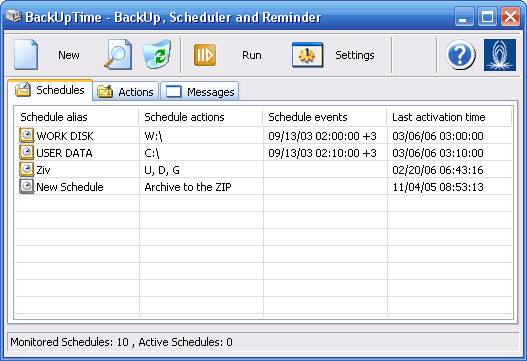
Whatever may your job be, whether a manager, a journalist or a student, if you are working on a computer, your job most likely is about creating information. No doubt, it is ultimately important to take care of saving the results of your work.
Unfortunately, modern technologies cannot guarantee 100% that your data will be safe: computer viruses; technical difficulties; information damage, caused by influence of other programs - this is just a small fraction of all possible hazards, which can harm your files. We are sure that you are taking all the necessary precautions; however, the risk is still high, because you cannot be protected from the unexpected threats.
The only ultimate way of keeping your data away from any kinds of surprises is performing a regular backup. Many people tend to avoid this, because it seems so complicated: you need to constantly remind yourself about the necessity of data backup; interrupt important actions or affairs to create an archive, as well as remembering where exactly the archive itself is stored. Indeed, it used to be like that; however, with the creation of a program, called BackUp Time, the process of duplicating your work became as easy as "one-two-three" (read more) All you need is to:
- Install the program. The program's interface is quite simple and easy-to-use, so the installation process won't take long.
- Set up the required archiving frequency (for example, "daily at 7 PM" or "every Friday".)
- Set a path to the location where the information is stored.

That's it! Now you can forget about the archiving routine - BackUp Time will take care of everything. It will:
- Create a backup copy of your data.
- Compress the data into a zip-archive to save the disk space.
- Write it to any required storage medium: disk, CD or DVD (if you have the corresponding recording equipment and drivers), hard-drive (including the local network), memory card, optical drive etc.
- Show you the archive location when you need it. Even if you keep a lot of backup copies, finding the right one will not be complicated: BackUp Time can automatically assign names to the archives, corresponding to the date of creation or the zip-archive name.
You will get rid of one of the most obnoxious procedures in your work - and that is already a good reason to use BackUp Time. However, we have a surprise for you - upon installing BackUp Time, you also receive an excellent planner, which will remind you about important events or will independently start a required program. For example, you can set the planner to regularly start the scanning routine or the disk cleanup program.