SecureWord is one of the most convenient password keeper ( manager ).
Price: 9.95 EUR per user.
Price include technical support by E-mail for an one year and free upgrades for the current version ( 1.x ).
download secureword purchase secureword help for secureword more screenshots protection scheme secureword.mobile syncSupported systems: Windows 95, Windows 98, Windows Me, Windows NT, Windows 2000, Windows XP, Windows server 2003, Windows Vista, Windows 7 ( Seven ), Windows 8 ( Eight ), Windows 10, Windows Mobile
SecureWord application have successfully passed the test Verified for Windows XP by VeriTest.
Bottom Line: SecureWord is easy and useful password keeper. Secure, password protected database to store any confidential information.
Confidential information protection, secure password keeper

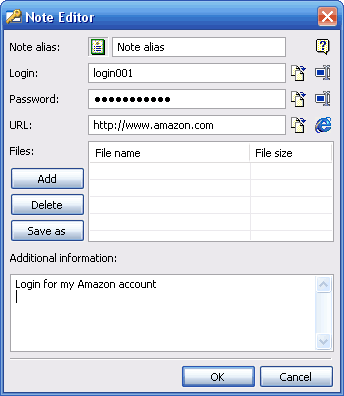
Every day you obtain more and more information, which you would like not to share with others. Passwords and pin-codes, credit card and bank account numbers and personal notes cannot all be kept in the safest storage of all - your own memory - and it is not safe to trust an organizer or a computer with public access with such information... We now have a solution for you: SecureWord! The very name of the program unfolds its essence: you simply have to remember one "secure word", providing access to a safely encrypted database. This database is not just for storing individual pieces like passwords and logins; you can protect entire files and folders from unauthorized access. Even if some intruder gets access to your computer, your encrypted data will be safe.
SecureWord is more than just a secure storage for your data; it also performs a range of functions, making it easier to work with that information:
- Search within the database. If your informational database size exceeds a few pages, regular browsing might take too long. Using SecureWord, you can spend this time more rationally, while the required information will be found practically momentarily by a keyword (or even a part of the word.)
- Clipboard information protection. Similar to the majority of people, you are most likely copying your logins and passwords through the clipboard, instead of typing them in manually, risking to make a mistake. However, the data, contained in the clipboard, is unprotected and if you get distracted from your computer for a while, anyone can access this information. SecureWord has a complex solution for this problem: firstly, you can always check if the clipboard contains any text, through the status bar; secondly, clipboard is automatically cleared on program exit and minimization to the task bar.
- Multi-user mode support. If a few users have access to a computer (say, family members), each one of them can have their own protected notes database.
- Passwords generator. If you often have to compose new passwords, you are well aware of what a headache it is. Nonetheless, with SecureWord you don't need to worry about a password being easy to remember, you can now use really difficult (and secure) passwords, made of random sets of characters. You can assign creating passwords to a built-in generator in SecureWord.
- Importing a file with passwords. If you are constantly using several computers (workstations at home and work and/or a laptop), you need to have a copy of your database for all of them. To do that, you simple need to copy one file! Besides, if you are also using BackUp Time, you can have a regularly updated database version on each one of your computers.

Who will need this (utilization examples):
- People, working on public access computers - for protecting confidential information from other users.
- System administrators - for storing logins and passwords of all network users, as well as generating new passwords.
- Senior accountants or financial directors - for protecting corporate financial information.
- Active Internet users - for storing passwords to different websites.