CEZEO software logo  / home / tips-and-tricks / windows-xp-firewallContact uscontact us 
Firewall in the Microsoft Windows XP SP2
Software ProductsProducts Software SolutionsSolutions DownloadsDownloads Purchase productsPurchase SupportSupport
Software ProductsCommercial Products
Software ProductsFree Products

Software SolutionsSolutions

DownloadsDownloads

Purchase productsPurchase

Product helpHelp manuals

Product tutorialsTutorials

Tips and tricksTips and tricks

SupportSupport

Windows XP SP2 Firewall configuration for instant messaging


Windows XP firewall configuration


Find the Windows XP firewall in the Control panel. Open control panel from a Start button.

find firewall


XP Firewall icon is globe with wall. Double click on it.

execute firewall


Choose the Exceptions tab and hit the Add program... button.

windows firewall


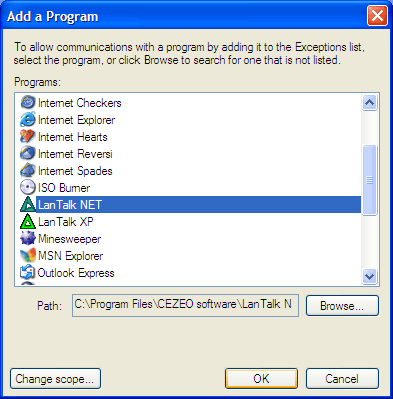
Select application that should be excluded from an firewall activity and hit OK button.

Note for LanTalk XP users: Please set the check box in File and Printer sharing too.
select application


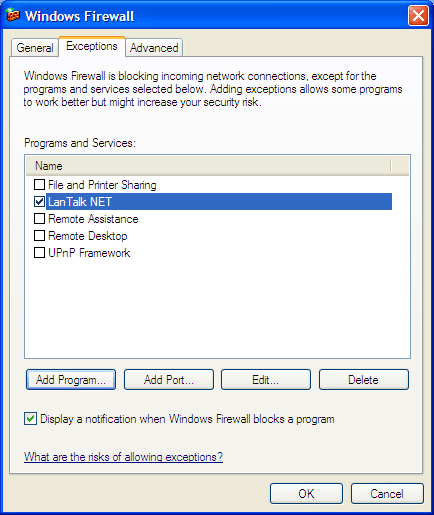
Selected application will connects to the network without any problems. Windows firewall will not block it more. But be sure that the Disable exceptions in the Security center is NOT enabled.
result


Do you need the Instant Messenger for LAN / Intranet ? ( click here to learn more )


Legal notices Privacy policy About us Copyright 1999 - 2009 © CEZEO software Ltd. All rights reserved.