LAN messenger for inter office usage for a small, medium and large networks. Designed to work in the isolated local network environment. Compatible with Terminal Server.
download LanTalk NET download Lan Messenger NET MSI package of LanTalk NET service for Terminal server purchase LanTalk NET deployment info faq customer testimonials help screenshots media kitPrice: 17.95 EUR per user for up to 9 users, price goes down at higher quantities.
Price includes technical support by E-mail and free upgrades for the current version ( 3.x ).
Supported systems: Windows 95, Windows 98, Windows Me, Windows NT, Windows 2000, Windows XP, Windows server 2003, Windows Vista, Windows 7 ( Seven ), Windows 8 ( Eight ), Windows 10 ( Ten ), Terminal Server
The LanTalk NET application have successfully passed the test Verified for Windows XP by VeriTest.

Bottom Line: Fault-tolerant and fully distributed, Intra office LAN messaging software.
Designed for Your Business
LanTalk NET is designed to be used in the office network environment, providing unique benefits to your office communication workflow and making staff management faster and easier.
Faster than Email
Manage employees faster and more efficiently by sending an instant message instead of an email. Send a short message instantly or a large file in a matter of seconds; that same operation takes much longer with email!

Instant Messaging. Instant Replies
Working in a fast-paced environment? Save valuable time posting or broadcasting a new message or sending a reply by utilizing LanTalk NET two-click messaging. A pre-defined message can be sent to a single recipient or broadcasted to a group with just two mouse clicks. Defining a new template also takes no more than two mouse clicks.
Flexible
Choose interface and functionality that you need.

Group and Offline Broadcasting
Broadcast instant messages to a group just as easily as you post to a single recipient even if they are currently off-line. If some or all recipients are not available at the time of broadcasting, your messages will be delivered immediately after they sign in.
Zero Administration
LanTalk NET requires no configuration, no administration, and no dedicated messaging server. LanTalk NET workstations communicate directly to each other, providing maximum speed and reliability.
No Chit-Chat
Restrict social chatting among employees with read-only and reply-only modes. Employees set to read-only mode will be able to receive directions and broadcasts, but won't be able to reply or initiate new conversations. Those in reply-only mode are restricted to replying to the original message sender.
Network Tasks and Events
Assign the tasks to employees and track the changes inside LanTalk!
No Messaging Server and No Internet Connection
Reliability matters. Even the best Internet providers fail, and even the best servers break down. LanTalk NET does not depend on an Internet connection for its operation. It sends and receives messages over your corporate LAN, and does not require an external Internet connection or a dedicated messaging server.
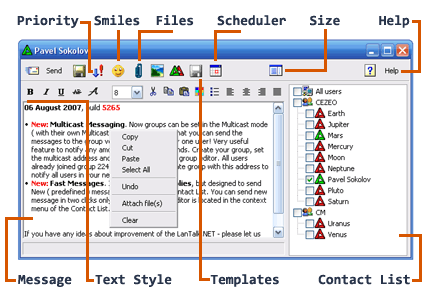
Built-in Scheduling
Schedule message delivery to an exact time. Send scheduled announces or regular reminders with customizable schedules for single and repeat events.
Compatible with Microsoft Terminal Server
LanTalk NET can be launched under Terminal Server environment. You should install LanTalk Service for Terminal Server to enable this feature. Please click here to download LanTalk Service for Terminal Server.
Corporate Instant Messenger
LanTalk NET provides easy and secure instant communication over your corporate network with Active Directory support. Broadcast messages to all or groups of employees in a few seconds. Send lightning-fast messages or send instant replies in just two mouse clicks with pre-defines templates. Define templates with two mouse clicks. Communicate securely over your local area network - no information leaks to the Internet, ever!
Secure Local Network Operation
Unlike the free instant messengers such as AOL Messenger, ICQ, Windows or MSN Messenger that use Internet to transfer messages even if the two computers are one room apart, LanTalk NET communicates exclusively over your corporate local area network (LAN). LanTalk NET does not require an Internet connection, eliminating any chances of information leaking outside of your corporate premises.
Secure and Reliable Communications
Communicate privately and securely with LanTalk NET thanks to its built-in security features.
Key Features
- Command line interface ( CLI ) to send messages
- Network based tasks and events
- Read receipts, you will be notified when the user has read your message
- File transfers replace e-mail attachments
- Broadcast Messaging for instant broadcasting
- Serverless operation with live contact list
- Paste images from clipboard
- Internal Scheduler
- Drag and Drop support
- Active Directory support
- Compatible with Terminal Server
- HIPAA friendly instant messenger
- Offline delivery
- Graphical Emoticons and Embedded Images
- Configurable user interface
- Read-Only and Reply-Only modes to restrict social chatting
- Printing support
- Fast Replies ( canned responses )
- Fast Messages
- Multilanguage support
- Conversation History
- Automatic Check for Updates
- Message priority
Finally, you can request some feature to be added, and for an acceptable fee you will get a custom version of LanTalk NET
Languages supported: English, French, Svenska, Dutch, Norwegian (Bokmal), Deutsch, Espanol, Italiano, Japanese.
LanTalk NET is no longer compatible with winpopup or net send command, take a look at LanTalk XP if you need these features.
Our Awards:
