PRODUCTS
SOLUTIONS
DOWNLOADS
PURCHASE
HELP
TIPS & TRICKS
SUPPORT
/
home
/
help
/
backuptime
/
add-actions
Introduction
About BackUpTime
How to Create a Schedule
Program Description
Main Window
Tabs Containing Lists
Toolbar and Controls
Status Bar
Program Settings
About the Program
Basic Controls
Schedule Editor
Time Event Editor
Folder Editor
Dynamic Folder Editor
Custom Folder Editor
Filter Editor
Action "Copy" Editor
Action "Archive" Editor
Action "Execute" Editor
Action "Play Sound" Editor
Action "Show Message" Editor
Action "Send Message" Editor
Action "Pause" Editor
Adding Actions
Action "Delete" Editor
Browse for Folder
Message Viewer
Context Menus
Schedules List Menu
Actions List Menu
Folders List Menu
Additional Information
Strftime Formatting Notation
Translating the Interface
Environment Variables
License Agreement
Adding Actions
Use this window to add an action to a schedule.
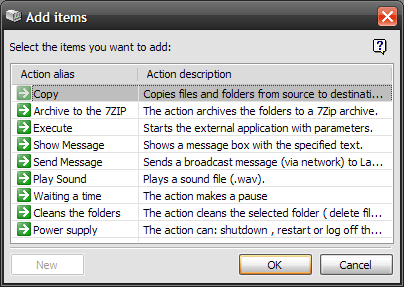
You can select more than one action at a time. To do so, please, hold down the
Ctrl
key while selecting actions.
Action
Description
Copy
This action copies selected folders.
Execute
This action runs a program or opens a file of a registered type.
Show Message
This action displays a window with a specified text.
Send Message
This action sends a message over the network. The message can be received with LanTalk, Winpopup or the Messenger service.
Play Sound
This action plays a specified sound file (.wav).
Archive to 7ZIP
This action compresses selected folders to a 7Zip archive.
Pause
This action simply suspends the schedule execution by a specified amount of milliseconds.
Clear folders
This action removes the selected files and folders.
Double-clicking a list item will instantly add it to the schedule.
PRODUCTS
LanTalk NET
SecureWord
LanTalk XP
LanInfo XP
SsdReady
BackUpTime
SecureWord Mobile
Netsend
PasswordsGuru
Disk Redactor
Network Info Requester
SOLUTIONS
Enterprise instant messaging
Corporate network messenger
One way instant messenger
Emergency network notification
Messenger for Terminal Server
Intranet instant messaging
Intranet alerter
Easy BackUp software
Secure password Keeper
HELP
LanTalk NET help
LanTalk XP Help
SecureWord Help
BackUpTime Help
NetSend Help
TIPS AND TRICKS
Msg Command
Net Send Command
Net Use Command
Netsh network administration
Use WinChat messenger
Disable Windows messenger
Windows Firewall XP SP2
Create secure password
Disable messenger service
Legal notices
|
Privacy Policy
|
About Us
1999 - 2026 © CEZEO software Ltd.. All rights reserved.