PRODUCTS

 SOLUTIONS

 DOWNLOADS

 PURCHASE

 HELP

 TIPS & TRICKS

 SUPPORT

 / home / help / lantalk-net / options-user-info

Getting starting
Using LanTalk.NET
Options
Information
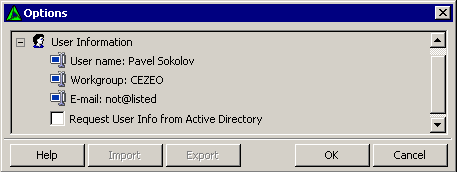
   LanTalk.NET Options - User Info

Here you can change data about user, his/her name, workgroup, and e-mail address. We recommend change user data here, not in the contact list.

User name The user's name.
Workgroup The user workgroup. Subgroups are allowed, use WORKGROUP/SUBGROUP to include a user to a SUBGROUP.
E-mail E-mail of the user (we will add the Reply by Email function soon).
Request User Info from Active Directory LanTalk NET will request User Name from displayName property and Workgorup from Department property of Active Directory.


Legal notices  |  Privacy Policy  |  About Us

1999 - 2013 © CEZEO software Ltd. All rights reserved.