PRODUCTS
SOLUTIONS
DOWNLOADS
PURCHASE
HELP
TIPS & TRICKS
SUPPORT
/
home
/
help
/
lantalk-net
/
fast-message-editor
Getting starting
About LanTalk.NET
Features overview
How to start
Using LanTalk.NET
Message view
Message editor
Contact list
Contact Editor
Main toolbar
Online status
Main menu
Main menu - Message
Main menu - View
Main menu - Tools
Main menu - Help
Fast Replies
Fast Reply Editor
Fast Messages
Fast Message Editor
Folders list
Folders Editor
Folder Editor
Search in Messages
Print Message
Move Message
Scheduler
Schedule Editor
Time Event Editor
Choose Message
Workgroup Editor
IM Interface
Message notifications
Options
Interface Options
Messaging Options
Contact List Options
User Info
Network Options
Info Panel Options
Information
CLI - command line interface
Deployment
License agreement
Frequently asked questions
Translate interface
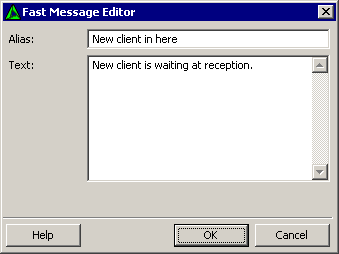
Fast Message Editor
Here you can edit or add fast message.
Alias
The short name of the message. You can leave this field empty, LanTalk.NET will build the alias automaticly from the actual text of message.
Text
Actual text of the message.
PRODUCTS
LanTalk NET
SecureWord
LanTalk XP
LanInfo XP
SsdReady
BackUpTime
SecureWord.Mobile
Netsend
PasswordsGuru
Disk Redactor
Network Info Requester
SOLUTIONS
Enterprise instant messaging
Corporate network messenger
One way instant messenger
Emergency network notification
Messenger for Terminal Server
Intranet instant messaging
Intranet alerter
Easy BackUp software
Secure password Keeper
HELP
LanTalk NET help
LanTalk XP Help
SecureWord Help
BackUpTime Help
NetSend Help
LanTalk NET Online demos
BackUpTime Online demos
TIPS AND TRICKS
Msg Command
Net Send Command
Net Use Command
Netsh network administration
Use WinChat messenger
Disable Windows messenger
Windows Firewall XP SP2
Create secure password
Disable messenger service
Legal notices
|
Privacy Policy
|
About Us
1999 - 2013 © CEZEO software Ltd. All rights reserved.