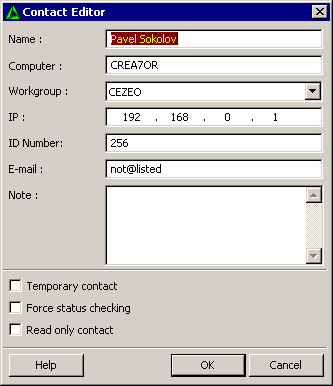
At first sight, the Contact Editor may look rather complicated, but that is not so. LanTalk.NET fills out all the fields automatically.
Creating a contact manually is easy...only two fields are necessary - Name and IP.
Name
The name that will be displayed in the Contact List.
Computer
The name of the computer with which the contact works.
Workgroup
The name of the group to which the contact belongs.
IP
The IP address of the contact.
ID Number
Contact's ID number (license number). Makes finding a desired contact easier.
E-mail
The contact's e-mail address.
Note
Additional information about the contact.
Additional contact options.
Temporary contact
Does not save the contact when closing the application. This can be useful when testing or adjusting the application.
Force Status checking
If, for some reason, an automatic status check doesn't work, enable this option to check the status of the selected contact individually. Also it should be enabled for contacts that outside your network or behind the router.
Read only contact
Enable this option to prohibit editing of the contact's info.