ShortCut Creator for Windows 8
How to create shortcuts to Control Panel and other internal settings in Windows 8, Windows 7, Windows Server 2008, Windows Server 2012.
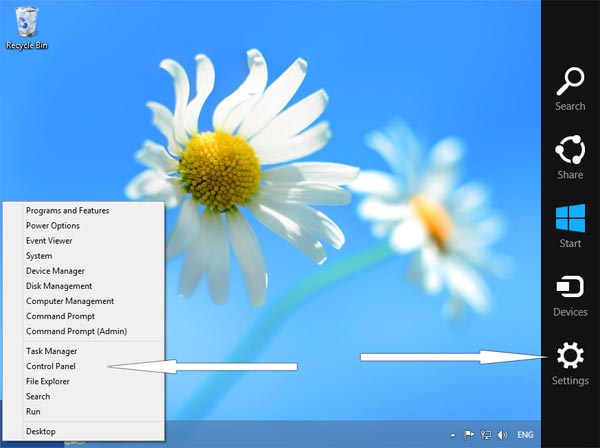
There is a few ways to access settings and control panel in Windows 8. Now we'll let you know about them.
1. Move your mouse to the right-top corner of the screen -> Settings -> Control Panel.
2. Move your mouse to the left-bottom corner of the screen and click right mouse button.
And the easiest way - try our free tool to create shortcuts on your Desktop:
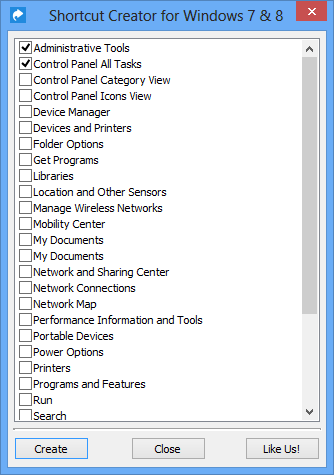
Select shortcuts that you want to have on desktop and click "Create".
ShortCut Creator supports many items. Here is the list of supported internal Windows 8 commands (and shortcuts):
- Administrative Tools
- Control Panel All Tasks
- Control Panel Icons View
- Control Panel Category View
- Device Manager
- Devices and Printers
- Folder Options
- Get Programs
- Libraries
- Location and Other Sensors
- Manage Wireless Networks
- Mobility Center
- My Documents
- Network and Sharing Center
- Network Connections
- Network Map
- Performance Information and Tools
- Portable Devices
- Power Options
- Printers
- Programs and Features
- Run
- Search
- Sync Center
- System
- Taskbar and Start Menu Settings
- Windows Firewall
- Windows Mobility Center
- Windows Update
- Tablet PC Settings