PRODUCTS
SOLUTIONS
DOWNLOADS
PURCHASE
HELP
TIPS & TRICKS
SUPPORT
/
home
/
help
/
lantalk-xp
/
scheduler
Introduction
Welcome
Features overview
Quick Start
Send message
Reply to message
Receiving messages
User Interface
Fast Messages
Auto Answers
Fast Answers
Navigator
Main window buttons
Tools
Print messages
Export messages
Go to message number
Scheduler
Add schedule
External Sender
Find text in Inbox
Main menu
Message
Navigation
Tools
Options
Help
Users List
Users list
Users list menu
Add users to users list
Additional Information
Frequently asked questions
License
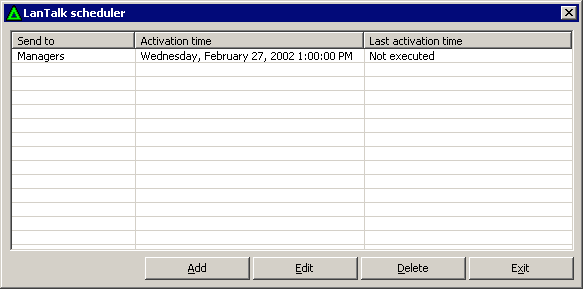
Messages Scheduler - Main window
Main scheduler window, you can Add, Edit or Delete tasks here.
Send to
The receiver of the message.
Activation time
Activation time for schedule.
Last activation time
Last time schedule was executed.
Add
Press this button to add new schedule to Scheduler.
Edit
Press this button to edit selected schedule in Scheduler.
Delete
Press this button to delete selected schedule.
Exit
Press this button to exit from Scheduler.
PRODUCTS
LanTalk NET
SecureWord
LanTalk XP
LanInfo XP
SsdReady
BackUpTime
SecureWord Mobile
Netsend
PasswordsGuru
Disk Redactor
Network Info Requester
SOLUTIONS
Enterprise instant messaging
Corporate network messenger
One way instant messenger
Emergency network notification
Messenger for Terminal Server
Intranet instant messaging
Intranet alerter
Easy BackUp software
Secure password Keeper
HELP
LanTalk NET help
LanTalk XP Help
SecureWord Help
BackUpTime Help
NetSend Help
TIPS AND TRICKS
Msg Command
Net Send Command
Net Use Command
Netsh network administration
Use WinChat messenger
Disable Windows messenger
Windows Firewall XP SP2
Create secure password
Disable messenger service
Legal notices
|
Privacy Policy
|
About Us
1999 - 2026 © CEZEO software Ltd.. All rights reserved.